
The short answer
Keep useful URLs and content where possible. Map necessary changes, test redirects and indexability, and monitor the live release. These checks reduce avoidable migration problems; they cannot guarantee unchanged rankings.
A website redesign can improve how customers understand your business. It can also change the pages and technical signals that search engines have already learned to recognize. The risk does not come from choosing a modern layout by itself. It often comes from changing important URLs, removing useful content, breaking links or launching pages that search engines cannot access correctly.
There is no way to promise that rankings will never move. But a redesign can be planned so that valuable information is retained and necessary changes are deliberate rather than accidental.
Start with an inventory of the existing website
Before designing new page layouts, record the current URLs, important page titles, service content, internal links and search traffic. Google Search Console can help identify pages that receive impressions and clicks, but business value also matters: a low-traffic contact page or specialist service page might still be important.
Classify each URL as keep, improve in place, merge, redirect or remove with an explicit reason. Do not delete content simply because a new template has fewer sections.
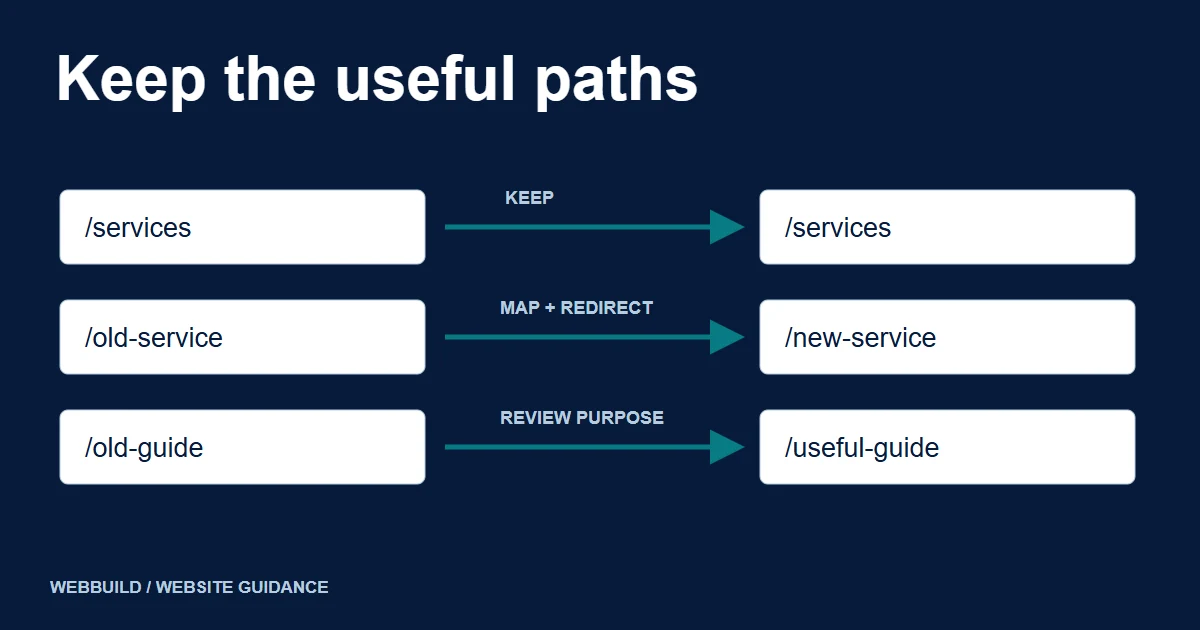
Keep URLs where possible
If an existing page is relevant and its URL makes sense, keeping that address may be simpler than changing it. A redesign does not require a new domain or a new URL for every page.
When URLs do change, map each address to its relevant replacement. A deliberate merger can have several old pages lead to one genuinely relevant new page. Avoid sending every old URL to the homepage: visitors who expected a specific service or article need an equivalent destination. Test the mapping with actual HTTP responses.
An illustrative URL decision log
| Old address | Decision | Intended response |
|---|---|---|
/services/example-service |
Keep the useful page and its address | HTTP 200 at the same URL |
/old-example-guide |
Move to an equivalent guide | A permanent redirect to that guide |
/retired-example |
Remove; no relevant replacement | HTTP 404 or 410 |
These are hypothetical paths, not WebBuild routes or a client migration result. Record the actual page owner and test result in your project log.
Illustrative URL relationships
Two useful pages. One relevant home.
Existing pages
Consolidated guide
/redesign-faq//redesign-tips//redesign-guide/Covers both original purposes.
Both existing addresses redirect permanently to the consolidated guide.
/old-event/Removed pagePreserve the information that makes a page useful
A visual overhaul may shorten pages, rename headings or reorganize navigation. Review the purpose of each page before editing its core explanation. Keep accurate service details, practical answers and evidence that matter to customers. Improve unclear content where appropriate; don't preserve weak copy merely because it existed before.
Build and test before changing production
Use a staging environment with suitable access restrictions. Keep its access controls separate from production indexability checks; do not assume a robots.txt block alone prevents indexing. Review responsive layouts, forms, internal navigation, canonical tags, robots directives, structured data and the sitemap. Make sure staging URLs are not unintentionally promoted as production pages.
Check whether the redesigned pages render useful text and links for search engines without relying on fragile interaction. Validate redirects, image assets and the main contact flow before launch.
Plan the launch as an operational change
Coordinate domain and hosting changes if any, confirm backups, keep rollback instructions and assign responsibility for monitoring. Google recommends making major changes in a controlled sequence where practical, rather than changing domains, CMS, layout and URLs all at once.
Record the launch date and the pages affected. After release, test key URLs, forms, redirects and crawlability from outside the development environment.
Monitor the right data after launch
Use Search Console to watch indexing, impressions, clicks and important page queries. Use analytics to monitor real visitors and enquiries where measurement is operating lawfully and correctly. Compare meaningful periods rather than reacting to one slow day.
Some ranking fluctuation after major changes can happen while Google recrawls and reevaluates pages. Google notes that site moves can require time to settle; that is not a reason to ignore genuine 404s, missing redirects or lost content.
For changed URLs, Google recommends keeping redirects for as long as possible, generally at least one year. A redesign that retains its domain does not need the domain-move Change of Address tool merely because the layout changed.
Review checkpoints
- Keep
- Useful page at the same address
- Move
- Relevant replacement and redirect
- Consolidate
- Destination covers the original purpose
- Remove
- No relevant replacement; record why
A practical prelaunch checklist
- Every important old URL has an explicit decision.
- Important content is retained or deliberately improved.
- URL changes have relevant permanent redirects where appropriate.
- Internal links point to the intended destinations.
- Canonical and robots settings use the production environment.
- Sitemap lists the correct canonical pages.
- Contact forms and notifications are tested.
- Mobile navigation and accessibility basics are checked.
- Backups, rollback and monitoring ownership are documented.
When to involve a developer
If your website contains an unusual CMS, custom forms, integrations, existing rankings or many important URLs, technical planning deserves special attention. A redesign partner can inspect the current architecture and translate design changes into a controlled migration plan. That may be a better investment than discovering missing URLs only after launch.
A strong redesign protects valuable content and customer journeys while making the website easier to use. Treat SEO migration, functional testing and post-launch monitoring as part of the redesign scope, not something to think about after launch.
Tell us about your project
Start with your details. We’ll discuss the right next step.
Discuss the next step
Explore WebBuild Website Redesign and use the existing redesign brief checklist to prepare your requirements.
Questions covered in this guide
Can a provider guarantee that rankings will stay unchanged?
No. A migration plan can reduce avoidable errors, but it cannot guarantee how Google will rank or index the changed site.
Must every page URL change during a redesign?
No. Keep useful, sensible addresses where practical and map necessary changes to relevant destinations.
Sources and project context
- Google Search Central: site moves with URL changes Checked 7 November 2026
- Google: control indexing with noindex Checked 7 November 2026
- Google Search Central: permanent redirects Checked 7 November 2026
- Google: HTTP status codes and crawlers Checked 7 November 2026
- Yukt Law Offices: redesign and continuing website care Web Build Solutions project record
Turn the question into a clear next step.
Tell us about your current setup, the people using it and what needs to improve.