
The short answer
Define the business question, the event being measured and the receiving record before comparing results. Keep visits, form interactions, received enquiries and qualified opportunities distinct. Agree what data is appropriate to collect and avoid promising a result the evidence cannot establish.
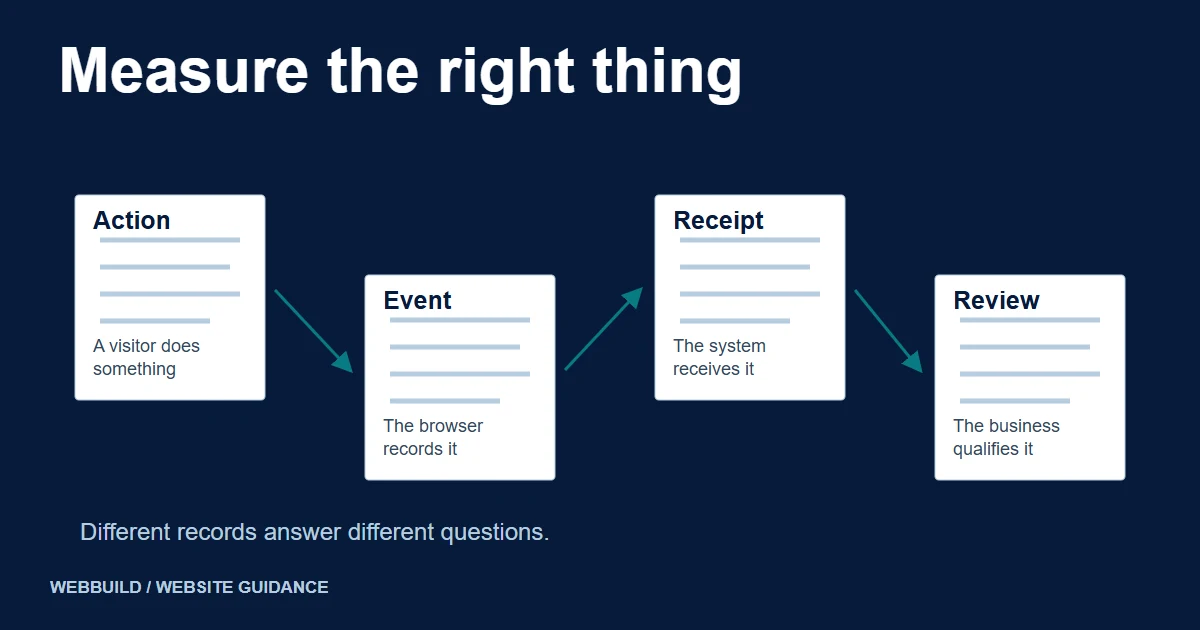
A redesign report is hard to interpret when the business and the website count different things. Marketing may report form events while the person handling enquiries sees missing messages, spam or requests outside the service scope. Define the observations before treating a change in a dashboard as a commercial result.
The aim of this plan is to make review possible. It does not supply a traffic forecast or assume that a redesigned website will increase leads. The agreed implementation and the actual evidence determine what can be reported.
Begin with a business question
Choose a question that affects a decision. For example: are visitors reaching the right service information, can they complete the enquiry task, and are received requests relevant to the work available? Each question needs a different source of evidence.
Avoid calling every interaction a conversion without explaining the definition. A telephone-link click shows an attempt to use that link; it does not by itself prove a completed call. A visible form confirmation does not establish that a staff member received or reviewed the message.
Define the event before implementing it
Record the trigger, expected frequency and meaning of each proposed event. Google's recommended-events documentation includes lead-related events, but they require implementation and suitable context; they are not automatically evidence of a successful enquiry process.
Ask the implementer to demonstrate the event for an agreed success case and relevant failure cases. Check for duplicate firing during retries or repeated clicks. Keep the implementation record connected to the wording used in the report so the business can interpret it later.
Illustrative evidence sources
Define the observation before comparing totals.
Recorded event
An implemented trigger records the action.
Define what fires it and check retries.Received enquiry
The agreed destination contains the request.
Verify receipt in that system.Business review
Someone applies an agreed qualification definition.
Keep an unreviewed state until assessed.An event does not establish receipt or qualification. Link observations only where the implementation and review evidence support the relationship.
Keep personal information out of analytics fields
Google's Analytics guidance prohibits sending information it can recognize as personally identifiable information. Review page addresses, event fields and form integrations so names, email addresses and message text do not become analytics parameters.
Operational enquiry handling and audience measurement have different purposes. Agree suitable collection methods, access and permissions for the actual audience before enabling a provider. This planning guide does not prescribe a consent or legal arrangement for every country.
Verify the receiving record separately
Use appropriate test data to follow an enquiry into the agreed mailbox or business system. Check that the record has the context needed to respond. Record the observed result, including a failure, rather than inferring receipt from a browser event.
The lead-capture guide explains the operational journey. The measurement plan should identify which part is represented by each metric and who investigates a disagreement between the systems.
Define qualification with the business
Ask the person handling requests what makes an enquiry useful: service fit, an identifiable requirement or another agreed criterion. Keep that definition explicit and allow an unreviewed state. Do not automatically label every form submission a qualified lead.
A review sheet can record the reporting period, definition, source, exclusions and responsible owner. If the underlying evidence is missing, report the gap. Do not fill it with an assumed conversion rate or an estimate presented as an observed result.
Compare periods with their context
Record relevant changes such as campaign activity, service availability or a different event definition. A before-and-after count alone does not establish what caused a change. Explain the limits alongside any measured result.
Include this plan in the redesign brief, or discuss a website redesign with the decisions your reporting needs to support. Agree the checks before launch so the first review uses definitions everyone understands.
Tell us about your project
Start with your details. We’ll discuss the right next step.
Questions covered in this guide
Is a form click a qualified enquiry?
No. A click, successful submission, received enquiry and qualified opportunity describe different observations.
Does this prescribe a particular consent arrangement?
No. Agree the collection method and permissions for the actual business and audience before implementation.
Sources and project context
- Supporting source Checked 7 November 2026
- Supporting source Checked 7 November 2026
- Yukt Law Offices: redesign and continuing website care Web Build Solutions project record
Turn the question into a clear next step.
Tell us about your current setup, the people using it and what needs to improve.